Start free

How Takarda AI works

Takarda AI reads. Fixed checks warn.

Six stages turn a file into checked rows. A check never changes a value, and nothing downloads until a person confirms it.

Stages

Who does what, at every stage.

Takarda AI, fixed checks and you each have a lane. A filled mark shows who acts at each stage.

Acts at this stageDoes not actLane orderTakarda AIFixed checksYou
  1. 01Prepare

    Your file is checked, turned upright, straightened and read for its words. A Word or text file becomes pages first.

    Never edits your original file.

  2. 02Read

    Takarda AI reads the page and fills each field you named, as printed. Fixed rules turn numbers and dates into plain values.

    Never does the sums.

  3. 03Place

    Each value is found on the page and given its box. Where a value cannot be found, you can draw its box yourself.

    Never draws a box it cannot confirm.

  4. 04Check

    Fixed checks test every value. A second look is taken at the doubtful ones.

    Never changes a value to pass a check.

  5. 05Fix

    You correct or confirm each warning, with the page beside it. Fixed checks run again after every change.

    Never confirms a file for you.

  6. 06Download

    The files you confirmed become an Excel, CSV or JSON file, one row for each file.

    Never downloads a file nobody confirmed.

01

Prepare

Takarda AI

For purchase orders, proposes which pages make one order and which pages are not orders. Other document types read every page you chose.

Fixed checks

Notes what the file is and checks its type, size and page count. Keeps the original unchanged. Turns Word and text files into pages. Turns each page upright, finds the page edge, corrects tilt, and rates the photo: fine, blurry, dark, cropped, too small or no text. Finds the page's own words, from the text layer or by reading the picture.

You

Upload. Choose the pages to read and whether each page is its own file. Take a photo again if it was rated poorly.

Never edits your original file.
Takarda AI works in stages 1 to 5. Download is fixed checks and you.

Checks

Fixed checks, not a model's opinion.

Every file goes through the checks its field list has. They are plain rules that test the page against itself. A check can warn about a value. It can never change one.

Every field list

G1

A required value is missing

A field you marked required that the page does not show reads Not on the page, and the file gets a warning.

Warns
G2

A number, amount or date cannot be read

A value that should be a number, an amount or a date but does not read as one is marked Check, with a plain sentence about what was printed.

Warns
G3

A list adds up to its total

When a field list says a list column must equal a total, such as invoice lines and the subtotal, a difference is marked Doesn't match with both numbers beside it.

Warns
G4

Parts add up to a total

When a field list says some values must add up to another, such as the subtotal and VAT making the total, a difference is marked Doesn't match with the numbers.

Warns
G5

VAT is 7.5% of the net amount

VAT is checked against the net amount at 7.5%, within one naira. A bigger difference is marked Doesn't match.

Warns
G6

The same file twice

A file uploaded a second time is noted, so you do not read it twice.

Notes

Purchase orders

Twenty-three more for purchase orders.

The purchase order field list adds 23 checks: dates, repeated orders, line sums, VAT, pack sizes, and your own product list and prices.

Other things make a value read Check without any of these checks: a poor photo, handwriting, or a second reader that is unsure.

When they run

After reading, and again after every change you make.

When one fails

A check that finds two printed numbers that disagree marks the value Doesn't match. Any other warning marks it Check. A suggestion is applied only if you click it. A value is never edited to clear a warning.

What they need

Most checks need nothing from you. A field list can also declare which sums must add up. A purchase order uses your product list, customer list and price lists once you upload them, and a check whose list is missing says so and does not run.

Limits

What Takarda AI is never sent, and what the checks stop.

Never sent

  • Your product list, customer list, price lists and expected totals are not in the reading step.
  • Page images go to Takarda AI, and the page's text on a retry. The descriptions of the fields you named go too. Your account name and your team's names do not.
  • Takarda AI is given no tools, no links to follow and no way to act. It returns values and nothing else.
  • Takarda does not use your documents to train any model.

The page carries whatever is printed on it, so a name or phone number on the document goes with it.

Built to stop

  • Filling a value the page does not show.
  • Calculating, rounding or correcting a printed number.
  • Drawing a box on text that does not match.
  • Passing a value that fails a check.
  • Editing a value to clear a warning.
  • Downloading a file before a person confirms it.
  • Turning a blurry photo into confident values.

The tests show what the checks miss as well as what they catch. See how it is tested

Status words

How a value gets its word.

Takarda AI does not rate its own confidence. Each value gets a word from what code could check.

On the page

Found in the page's own text by an exact match, once. No failed check. Not handwritten. The page is readable.

Check

Found only by a close match or a second look, or handwritten, or on a poor page, or a warning check failed, or the two readings disagree.

Not on the page

Not found on the page. Nothing is filled in. A required value that is missing also gives the file a warning.

Doesn't match

Two printed numbers disagree, a sum does not add up, or the second reader's fresh reading of an amount, quantity, date or ID differs.

Corrected

A person changed it. The original reading stays beside the change for as long as the file exists.

Confirmed

A person looked at it and kept it, or kept the printed value and gave a reason.

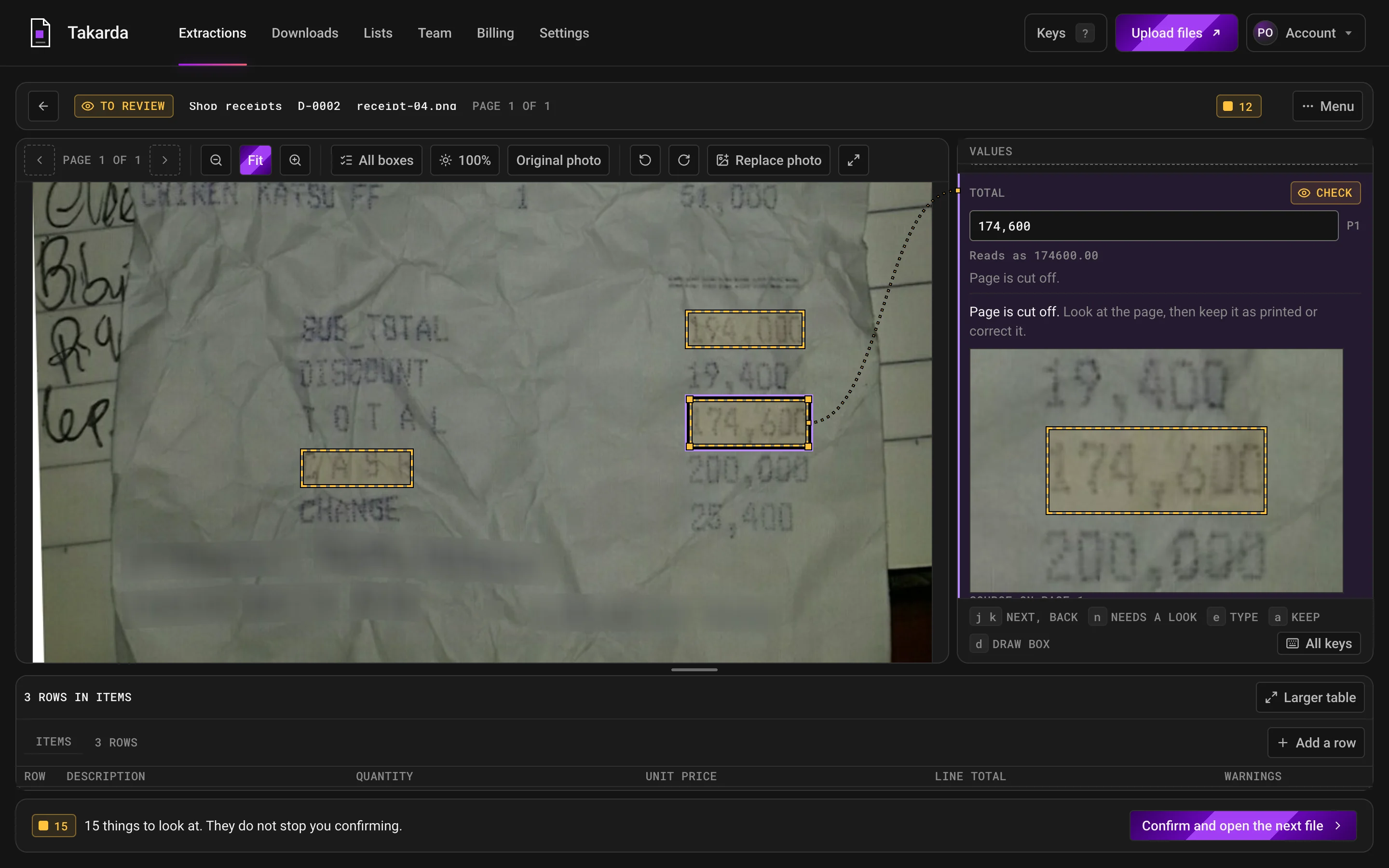
The review screen for a crumpled receipt photo. The Total value is selected and its box lights up on the page, linked to the value and a close-up crop.
The review screen on a real receipt photo. The selected value, the Total, is joined to its box on the page and to a close-up of what is boxed. The word Check says why a person should look. Credit: CORD v2, NAVER Clova, CC BY 4.0.
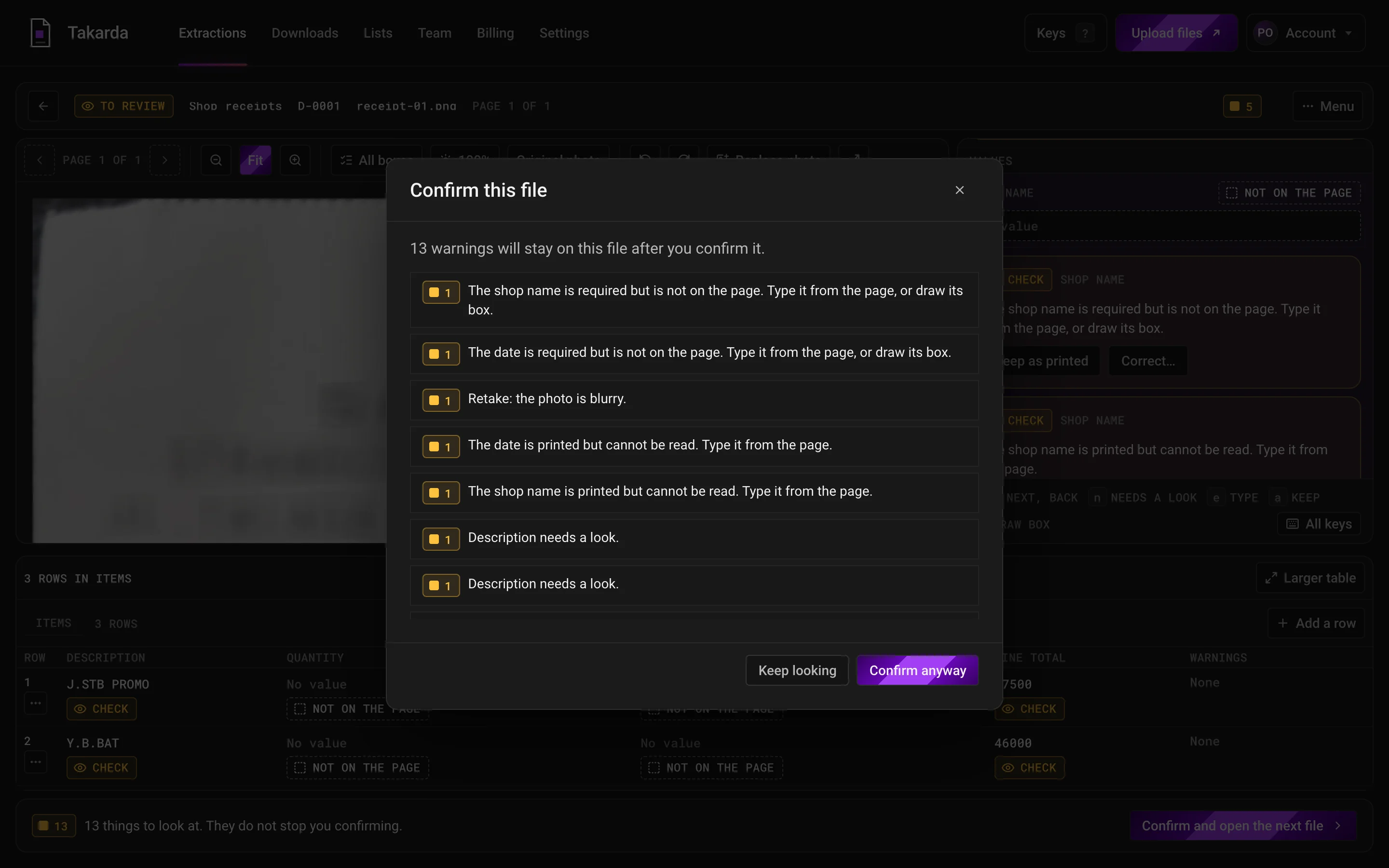
The window that asks you to confirm a file, listing the warnings that stay on it.
The window that asks a person to confirm a file. It lists every warning that stays on it, and nothing is confirmed until someone clicks. Same receipt photos. Credit: CORD v2, NAVER Clova, CC BY 4.0.

You confirm every file yourself. For most document types a warning does not stop you, but it stays visible and the confirm window lists it. A purchase order is held while a blocking check is open.

Safety rails

Two safety rails for page text and spend.

  1. 01

    Page text is data.

    A page can say anything, even "ignore your rules". Once a page is text, it is fenced between markers, and any copy of the markers inside it is altered so it cannot close the fence. Takarda AI is told fenced text is data, never an instruction. It has no tools to act with, and a person confirms every file.

  2. 02

    A daily allowance, by plan.

    Each account has a daily Takarda AI allowance set by its plan, and the whole service has one. Past either, reading pauses and resumes the next day. Nothing uploaded is lost.

How we test

Counted against an answer key made from the document itself.

We read real documents, then check every value against a key the document supplies. Each figure is printed as a count out of a total, with what it counts. What went wrong is printed beside what went right.

  1. 01

    The document makes its own key

    The answer key is built from the PDF's own text, with the place of every character. It is then checked against what the document prints about itself: the number of transactions, the totals, the opening and closing balances, and the balance after every row.

    Printed totals and balances

  2. 02

    Two people check the key

    Two independent checkers compare the key with the page pictures, row by row. Neither found a problem. Only then is Takarda scored against it.

    Two checkers

  3. 03

    Every cell is compared

    Takarda's rows are matched to the key's rows by date, amount and balance. Then each cell is compared by value: money to the kobo, dates by the day, descriptions word for word. A box counts when it sits where the key puts the same cell.

    Every cell scored

  4. 04

    Counts printed, failures shown

    Every figure is written as k of n with what it counts. A wrong value is listed, not left out. These are the figures of the version tested: changes made after the test have not been measured again and are not counted.

    k of n, and the failures

  • Transactions found

    983 of 983

    100%

    On two real bank statements, 48 pages in all. None missed, none invented.

  • Amounts and balances right

    1,966 of 1,966

    100%

    Every money in, money out and balance after a row, compared with the key.

    1,638 on the 36-page statement exactly; 328 on the 12-page statement by size (92 kept their printed minus sign)

  • Dates on the right day

    982 of 983

    99.9%

    Each transaction's date compared by the day.

  • Descriptions word for word

    944 of 983

    96.0%

    The rest are listed under what went wrong.

  • Boxes in the right place

    1,358 of 1,365

    99.5%

    Of the values that had a box, how many had it on the right spot.

    Only 1,365 of 3,932 values had a box at all.

  • Fields right on a quarterly report

    19 of 19

    100%

    A public quarterly report of a listed Nigerian bank, 37 pages, read with 19 fields written for it. 19 of 19 had a box on the page.

Real documents

Two bank statements and a quarterly report.

The files are real and long: 87 pages in all. Only counts, rates, sizes, times and costs are printed. No name, account number or amount from a statement is shown anywhere.

MeasureA fintech wallet statement, 36 pages, 819 rowsA naira account statement from a payments app, 12 pages, 164 rows
Rows found
819 of 819100%None missed, none invented
164 of 164100%None missed, none invented
Amounts right
819 of 819100%Money in or money out, to the kobo
164 of 164100%Right by size. 92 money-out amounts were stored with their printed minus sign
Balance after each row
819 of 819100%
164 of 164100%
Money in and money out mixed up
0 of 819Money in shown as money out, or the other way round
Not countedOne signed amount column
Dates on the right day
818 of 81999.9%1 wrong
164 of 164100%
Descriptions word for word
781 of 81995.4%38 not word for word28 of the 38 misses differ only in spacing; 6 lost the first line where the row starts at the bottom of a page; 4 have misread characters
163 of 16499.4%1 not word for word
Summary values at the top
10 of 10100%
10 of 10100%
Boxes in the right place
1,064 of 1,07199.3%7 in the wrong placeOf the values that had a box
294 of 294100%Of the values that had a box
Values that had a boxWeak point
1,071 of 3,27632.7%2,205 without a boxA weakness of the version tested: most right values had no box and said Not on the page
294 of 65644.8%362 without a boxThe rest were right but said Not on the page
Time
14 min 8 s from upload to ready
2 min 51 s of reading
Cost of reading
₦1,768 (about $1.11)At ₦1,600 to the dollar
₦293 (about $0.18)At ₦1,600 to the dollar

A count is the number of cells that matched the key, out of the cells that were scored.

A long report

A 37-page report, read with fields written for it.

No ready field list fits a quarterly report, so 19 fields were written for it in plain words. The file was then read twice: as a PDF, and with two of its pages as pictures.

As a PDF

A public quarterly report of a listed Nigerian bank

Interim consolidated accounts, 37 pages, amounts in millions of naira; read with a field list of 19 fields written for it (no ready list)

19 of 19

fields right

19 of 19

fields with a box on the page

  • A check passed: total liabilities plus total equity equals total assets.
  • 1 min 42 s from upload to ready
  • ₦175 (about $0.11) to read 37 pages

As pictures

Two pages read as photographs

A page held as a picture has no text to match, so it is the harder test. Each page was scored on the values it holds and on the fields it does not.

Page 2 as a picture: the income statement page

12 of 12 values on the page right

7 of 7 fields not on the page said Not on the page

Page 3 as a picture: the balance sheet page

10 of 10 values on the page right

9 of 9 fields not on the page said Not on the page

On the page

Where each value was found, on the real pages.

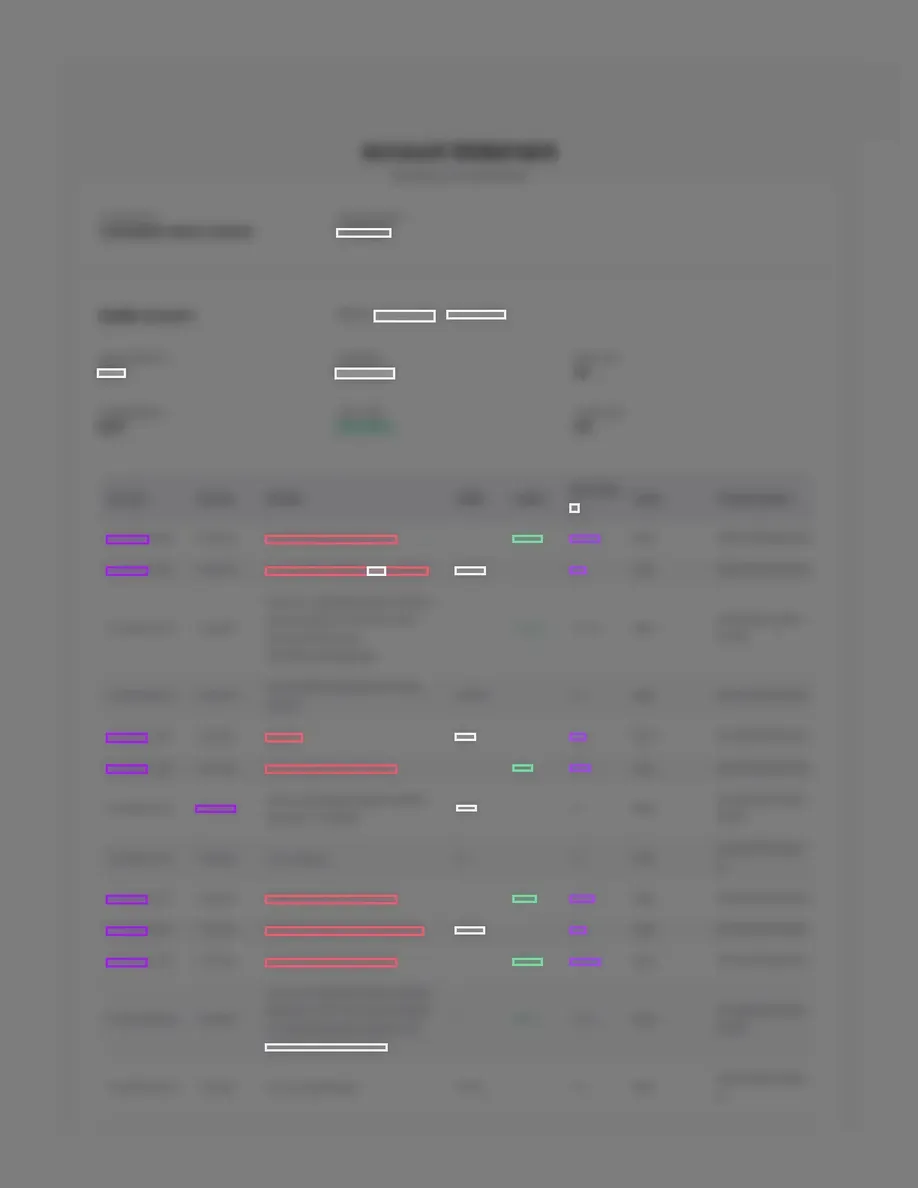
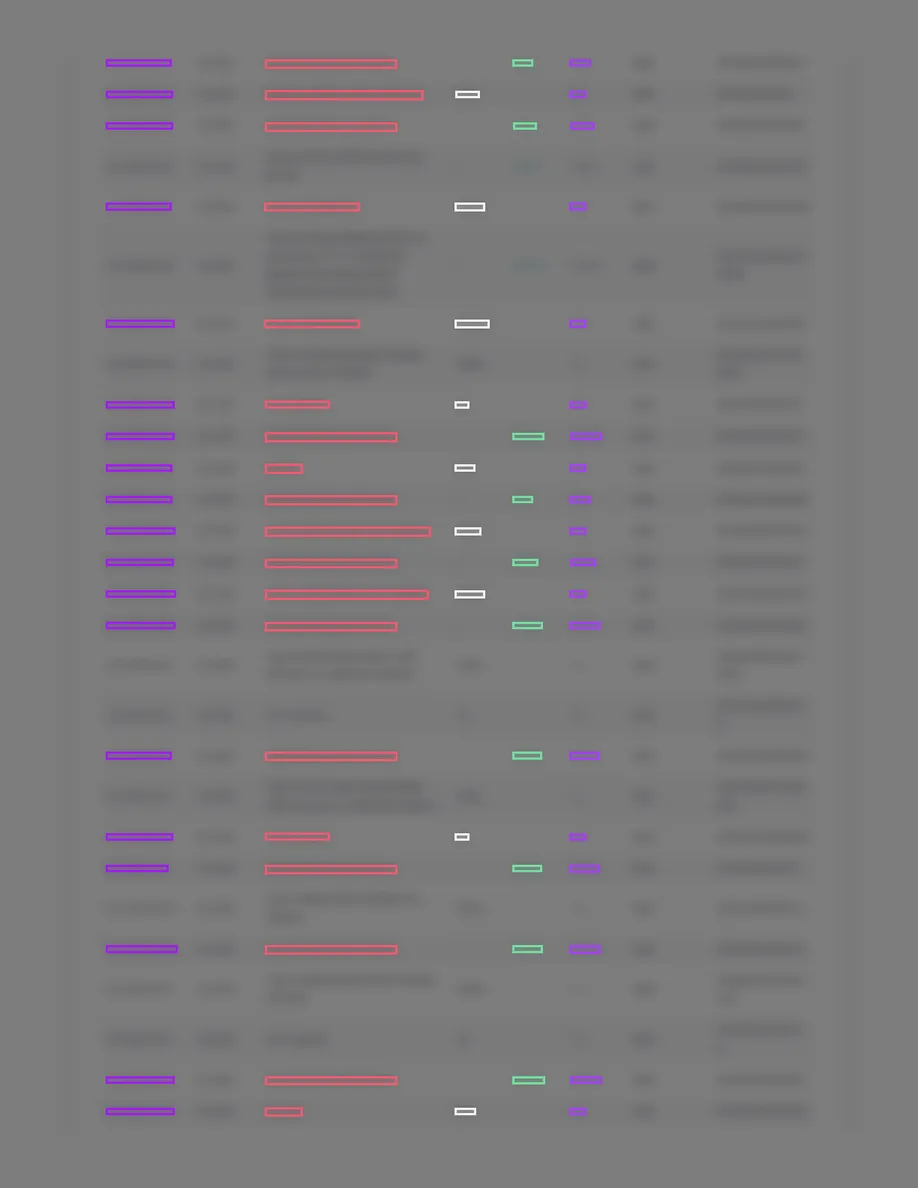
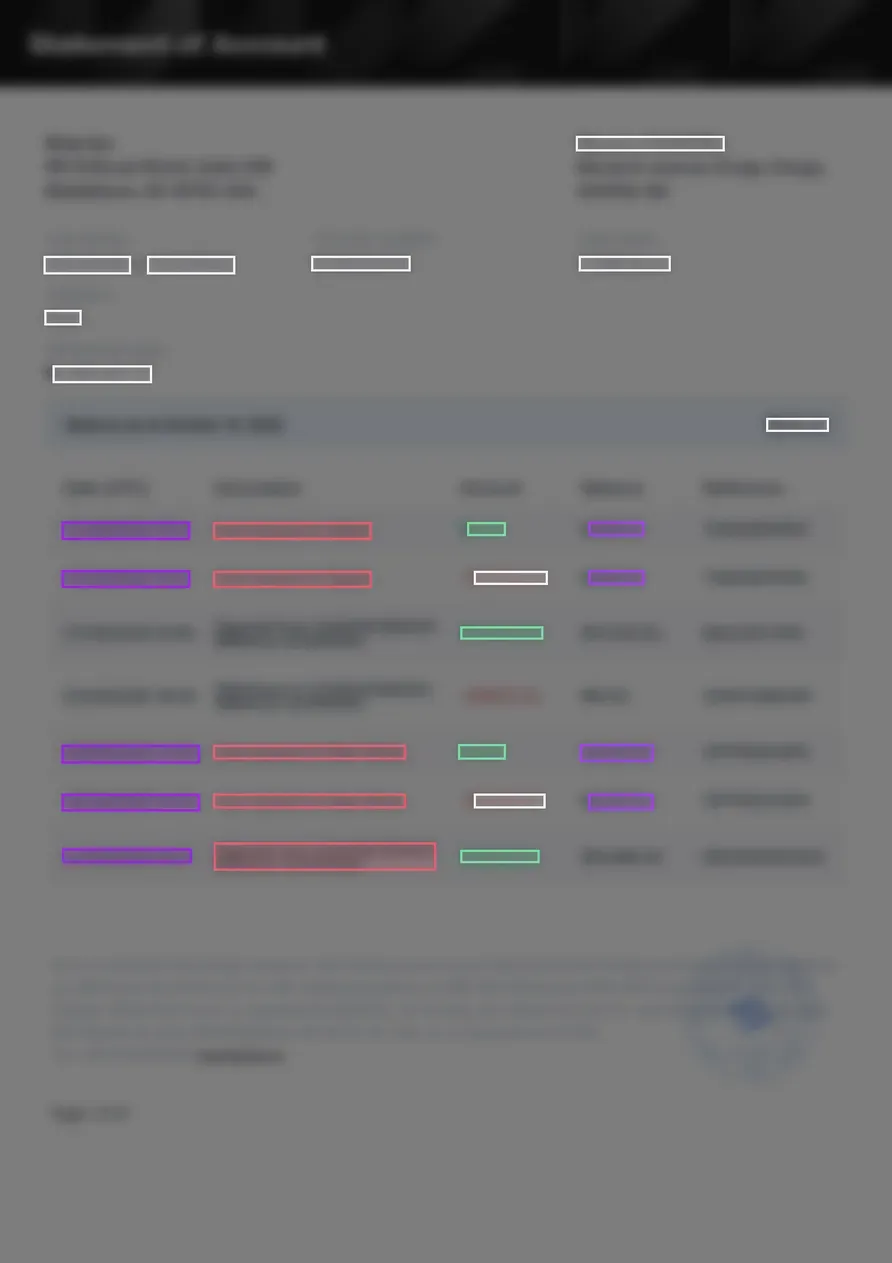
Every character on these pages is blurred on purpose. The coloured boxes are where Takarda found each value. A row with no box is the weakness listed next: the values were right but said Not on the page.

  • A blurred bank statement page with coloured boxes on the dates, descriptions and amounts that Takarda found. Some rows have no boxes.
    Page 1 of the 36-page fintech wallet statement. The summary and the first rows.
  • A blurred page of table rows from a bank statement, with coloured boxes on most single-line rows and none on rows whose description wraps.
    Page 22 of the same statement. Rows whose description wraps over several lines have no box.
  • A blurred table of seven transaction rows with coloured boxes on the dates, descriptions, amounts and balances that Takarda found.
    Page 1 of the 12-page naira account statement from a payments app. The transaction rows.

What went wrong

Failures shown, not left out.

These are the failures of the version tested, in the words of the test notes. Each one is a result on a real document.

Went wrong

A fintech wallet statement, 36 pages

  • Only 1,071 of 3,276 values had their box on the page; the rest were right but said Not on the page.
  • The file holds two accounts and the field list expected one, so the money in and money out totals were marked Doesn't match although every amount was right.
  • 238 dates printed with a time of day were read on the right day but not recognised as dates.
  • 24 of 66 reading calls ran out of room on dense pages; a third of the cost was spent on answers that were thrown away and read again.
Went wrong

A naira account statement from a payments app, 12 pages

  • 92 money-out amounts kept the minus sign the statement prints, so a download would show them as negative numbers.
  • 362 right values had no box and said Not on the page.

These are the figures of the version tested. Changes made after the test (more boxes on statement rows, one check per account, dates with a time, amounts without their minus sign, fewer wasted reading calls, descriptions across a page break) have not been measured again and are not counted here.

The same counting is done on a public set of real receipt photos. Those lines are next.

Tested

Tested on real receipts. Counts and sources shown.

Takarda is measured on a public set of real receipt photos, and the counts are printed beside every figure. The test is where each value's box lands, with the receipt's own words given. It is not a score for every document, and it says so.

96.8%

Box on the right words

On 200 real receipt photos, the box sat on the words it points to.

1,342 of 1,387 boxes

likely between 95.2% and 97.8%

100%

Missing totals reported as missing

Where a receipt printed no total, Takarda said Not on the page every time.

181 of 181 values

likely between 98.3% and 100%

73.0%

Values given a place

The rest are marked Not on the page. Nothing is guessed to fill the gap.

1,387 of 1,900 values

likely between 69.8% and 76.0%

2.7%

Boxes on the wrong text

A box that touched none of the words it should have marked.

38 of 1,387 boxes

likely between 1.8% and 4.2%

200 public receipts with their annotated words. Credit: CORD v2, NAVER Clova, CC BY 4.0.

MeasureWords as printedWith 6% of the numbers misread
Values given a place on the page73.0% (1,387 of 1,900 values; likely between 69.8% and 76.0%)70.8% (1,346 of 1,900 values; likely between 67.6% and 73.9%)
Box on the right words96.8% (1,342 of 1,387 boxes; likely between 95.2% and 97.8%)95.8% (1,289 of 1,346 boxes; likely between 94.1% and 97.0%)
Box on the wrong text2.7% (38 of 1,387 boxes; likely between 1.8% and 4.2%)3.3% (45 of 1,346 boxes; likely between 2.3% and 4.9%)
Missing total reported as Not on the page100% (181 of 181 values; likely between 98.3% and 100%)Not measured

A "likely between" range is where the true figure most likely sits, given how many receipts were counted. More receipts make it narrower.

  • Receipts only. Invoices, contracts and the rest are not scored here.
  • 27% of the values had no place on the page. They are mostly quantities and names that a receipt prints on a different line from the amount. Takarda marks them Not on the page rather than guess.
  • Of the boxes that landed on the wrong text, nearly all sat on the same value printed in another place on the receipt.

Questions

People ask these most.

Can Takarda AI add a value that is not on the page?

It is built not to. Each value must point to a box on the page, and fixed checks test it against the page's own words. A value it cannot place reads Not on the page. Some wrong values can still get through, so you check every file before it is downloaded.

Does it calculate or correct totals?

No. It copies the printed total even when the lines do not add up, and the checks flag the difference. Only you can change a value, and the printed one stays beside your change.

What if a page tells Takarda AI to do something?

Page text is fenced as data and Takarda AI is told never to follow it. It has no tools to act with.

What happens when the daily allowance runs out?

Reading pauses and resumes the next day. Nothing you uploaded is lost.

Who runs Takarda AI, and where?

It runs in the cloud, not on your device. It is sent page images, the page's text on a retry, and the descriptions of the fields you named. Takarda AI reads each page in the European Union.

More questions?

Book a demo

See a file become rows.